

RailCOMPLETE 2026.1 is here
We are releasing version 2026.1 of RailCOMPLETE. The most important change in this release is support for AutoCAD 2025 and newer versions. In addition, this release addresses several usability pain points, where achieving common tasks required an excessive number of steps or detailed knowledge of multiple systems. To reduce this friction, we have streamlined parts of the workflow and improved how several features are accessed. Details are outlined below.
You can find the full list of changes in the release notes.
AutoCAD 2025 support
Due to changes in Autodesk APIs from 2024 to 2025, RailCOMPLETE 2024.2 and older do not work with AutoCAD 2025 or newer. RailCOMPLETE 2026.1 works with AutoCAD /Civil 3D / Map 3D 2025 and 2026 as well as with the older versions of AutoCAD.
3D and IFC export
The 3D export has been overhauled with new commands, settings and interface improvements.
- “Insert 3D Preview” is now available from the right-click menu. Making a 3D block from a railway object is a common operation and is made easier through this change.
- The export 3D window is easier to work with with the ability to save only the current tab’s settings, reset the current tab’s settings or saving / resetting all settings to default.
- The IFC / DWG export no longer leaves exported graphics in the AutoCAD block table of the current drawing. This means that no time-consuming PURGE is needed after 3D exports.
- New settings give better control of 3D output. Previous RC versions’ Level Of Detail would unwantedly suppress (ignore) thin objects such as boards and 3D text items. You may now preserve such items while still reducing the complexity for thicker objects, with the new “Thinness” preservation setting.
- 3D export to DWG (and IFC) can now export geometries as MESH surfaces, i.e. small triangles and squares (tiles) that approximate the smooth surfaces of SOLID entities. You can specify the maximum angular change between adjacent tiles as well as the maximum deviation from a tile to its real surface. Exported files tend to be a lot smaller with almost no speed penalty when using meshed surfaces. Also, AutoCAD treats meshed 3D much faster than SOLID objects, so your meshed 3D will be faster to rotate and pan in DWG then SOLIDs.
- Export to IFC has several improvements, notably:
- Better control of IFC entities in export.
- Option to automatically set base point.
Lua Script Menu
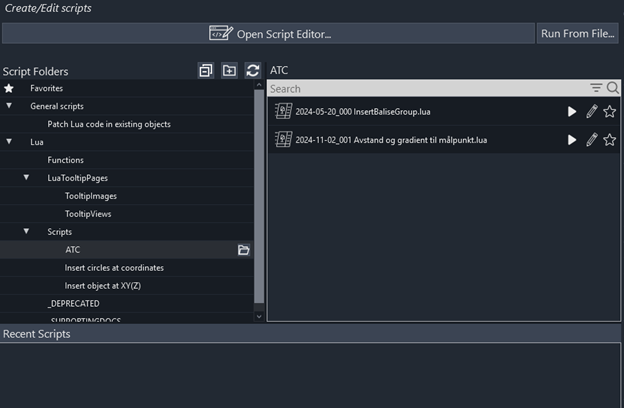
The run script button has been replaced by a run script menu. This provides an overview of your scripts including easy access to all your script folders, the ability to pin favorite scripts and a list of recently run scripts.
Lua Debugger
The debugger is improved with a new environment tab to see predefined global variables. We have cleaned up the keyboard shortcuts. “Add Watch” is now Ctrl+T instead of the former Ctrl+W (which is “Close Window” in most contexts).
Text Attributes
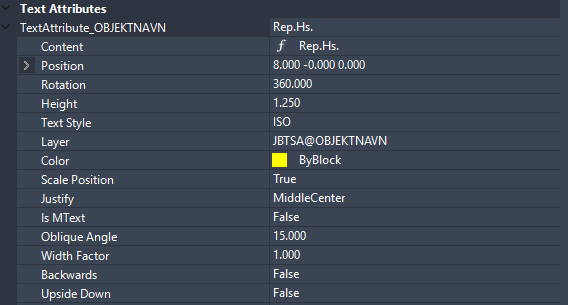
Text Attributes can now be edited in the Property manager. The text can be set directly from the Content sub-property, as a direct value or as a formula. As before, text attributes can only be declared in DNA – the user can neither add nor remove text attributes.
Value and Formula Picker
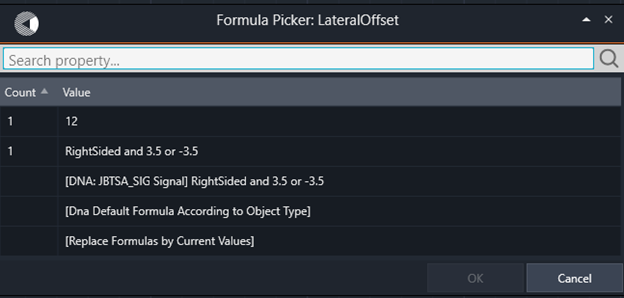
When editing several objects at once, you can now use “Pick Value” (F6) or “Pick Formula” (F7) to select the same value or formula for all the objects. You can also use this tool to make a new selection set consisting of all objects having the same value or formula as the one you select from the menu of available values / formulas.
The Value / Formula picker largely makes the existing command RC-EditProperties obsolete.

Excel exports of tables are now much faster.
In addition to this there are lots of minor UI improvements, small features, and bugfixes.
RC 2024.2 – Bessere 3D-Textanmerkungen als je zuvor

Mit RC 2024.2 lassen sich 3D-Grafiken blitzschnell mit Anmerkungen versehen. 3D-Glyphen (Buchstaben, Ziffern, Satzzeichen usw.) werden jetzt aus einem vordefinierten Satz geholt, wenn Sie Ihre Objekte beschriften wollen. Mit dem neuen Befehl RC-Erstellen3DTextStil können Sie jeden Textstil (Schriftart) auf Ihrem Computer in einen 3D-Textstil umwandeln, den RC für 3D-Anmerkungen verwenden kann. Der Befehl zur Erstellung von 3D-Textstilen berechnet auch das kerning aller Zweibuchstabenkombinationen.
Weitere Highlights für 2024.2:
- Geringere Größe für exportierte 3D-Dateien (DWG oder IFC)
- Besserer Kontrast in den Menüs des Setdefinitions-Managers
- Bessere Tooltips im Setdefinitions-Manager
- Bessere Sortieroptionen im Setdefinitions-Manager
- Wenn Sie den Anzeigepunkt des Hauptobjekts verschieben, werden nun auch die Anzeigepunkte aller angehängten Objekte entsprechend verschoben.
- Fehlerbehebungen
RC 2024.2 – bedre 3D-tekstkommentarer enn noensinne
Med RC 2024.2 er det blitt lynraskt å få 3D-grafikk til å vises med annoteringer. 3D-glyfer (bokstaver, sifre, tegnsetting osv.) hentes nå fra et forhåndsdefinert sett når du har behov for å annotere objektene dine. Med den nye kommandoen RC-Create3DTextStyle kan du konvertere en hvilken som helst tekststil (font) på datamaskinen din til en 3D-tekststil som RC kan bruke til 3D-annoteringer. Kommandoen for oppretting av 3D-tekststil beregner også kerning for alle kombinasjoner av to bokstaver.
Andre høydepunkter for 2024.2:
- Redusert størrelse for eksporterte 3D-filer (DWG eller IFC)
- Bedre kontrast i menyene i Pset Definitions Manager
- Bedre verktøytips i Pset Definitions Manager
- Bedre sorteringsalternativer i Pset Definitions Manager
- Flytting av hovedobjektets visningspunkt vil nå også flytte alle tilknyttede objekters visningspunkter tilsvarende.
- Feilrettinger
RC 2024.2 – Des annotations de texte en 3D plus efficaces que jamais
Avec la RC 2024.2, faire apparaître des graphiques 3D avec des annotations est devenu rapide comme l’éclair. Les glyphes 3D (lettres, chiffres, ponctuation, etc.) sont désormais extraits d’un ensemble prédéfini chaque fois que vous avez besoin d’annoter vos objets. La nouvelle commande RC-CreerStyleDeTexte3D permet de convertir n’importe quel style de texte (police) de votre ordinateur en un style de texte 3D que RC peut utiliser pour les annotations 3D. La commande de création de style de texte 3D calcule également le crénage de toutes les combinaisons de deux lettres.
Autres nouveautés de la version 2024.2:
- Réduction de la taille des fichiers 3D exportés (DWG ou IFC)
- Meilleur contraste dans les menus du gestionnaire de définitions de jeux de caractères
- Meilleures infobulles dans le gestionnaire de définitions Pset
- Meilleures options de tri dans le gestionnaire de définitions Pset
- Le déplacement du point d’affichage de l’objet principal entraîne désormais le déplacement des points d’affichage de tous les objets attachés.
- Corrections de bogues