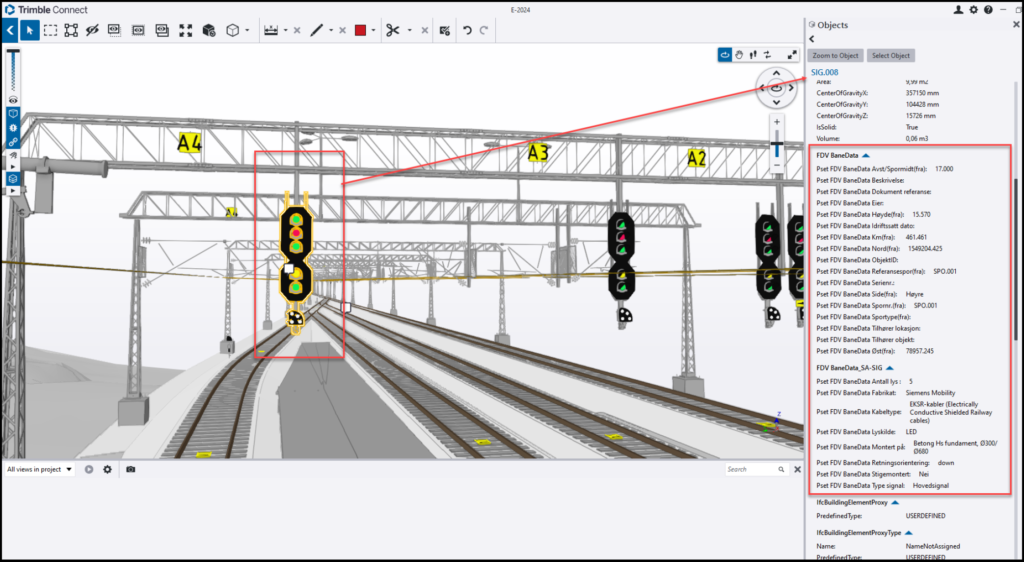
RailCOMPLETE 2026.1 is here

We are releasing version 2026.1 of RailCOMPLETE. The most important change in this release is support for AutoCAD 2025 and newer versions. In addition, this release addresses several usability pain points, where achieving common tasks required an excessive number of steps or detailed knowledge of multiple systems. To reduce this friction, we have streamlined parts of the workflow and improved how several features are accessed. Details are outlined below.

You can find the full list of changes in the release notes.

AutoCAD 2025 support

Due to changes in Autodesk APIs from 2024 to 2025, RailCOMPLETE 2024.2 and older do not work with AutoCAD 2025 or newer. RailCOMPLETE 2026.1 works with AutoCAD /Civil 3D / Map 3D 2025 and 2026 as well as with the older versions of AutoCAD.

3D and IFC export

The 3D export has been overhauled with new commands, settings and interface improvements.

  • “Insert 3D Preview” is now available from the right-click menu. Making a 3D block from a railway object is a common operation and is made easier through this change.
  • The export 3D window is easier to work with with the ability to save only the current tab’s settings, reset the current tab’s settings or saving / resetting all settings to default.
  • The IFC / DWG export no longer leaves exported graphics in the AutoCAD block table of the current drawing. This means that no time-consuming PURGE is needed after 3D exports.
  • New settings give better control of 3D output. Previous RC versions’ Level Of Detail would unwantedly suppress (ignore) thin objects such as boards and 3D text items. You may now preserve such items while still reducing the complexity for thicker objects, with the new “Thinness” preservation setting.
  • 3D export to DWG (and IFC) can now export geometries as MESH surfaces, i.e. small triangles and squares (tiles) that approximate the smooth surfaces of SOLID entities. You can specify the maximum angular change between adjacent tiles as well as the maximum deviation from a tile to its real surface. Exported files tend to be a lot smaller with almost no speed penalty when using meshed surfaces. Also, AutoCAD treats meshed 3D much faster than SOLID objects, so your meshed 3D will be faster to rotate and pan in DWG then SOLIDs.
  • Export to IFC has several improvements, notably:
    • Better control of IFC entities in export.
    • Option to automatically set base point.

Lua Script Menu

The run script button has been replaced by a run script menu. This provides an overview of your scripts including easy access to all your script folders, the ability to pin favorite scripts and a list of recently run scripts.
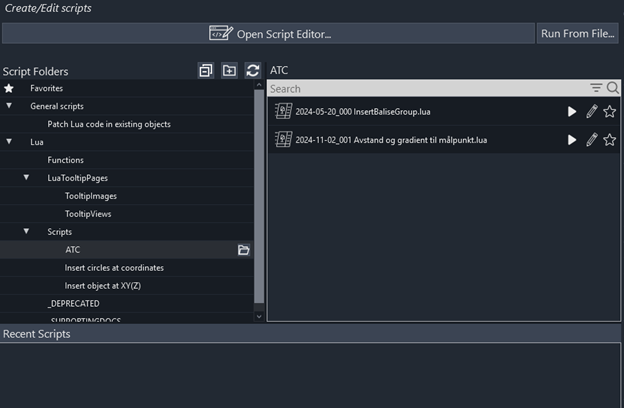
Picture of script menu

Lua Debugger

The debugger is improved with a new environment tab to see predefined global variables. We have cleaned up the keyboard shortcuts. “Add Watch” is now Ctrl+T instead of the former Ctrl+W (which is “Close Window” in most contexts).

Text Attributes

Text Attributes can now be edited in the Property manager. The text can be set directly from the Content sub-property, as a direct value or as a formula. As before, text attributes can only be declared in DNA – the user can neither add nor remove text attributes.
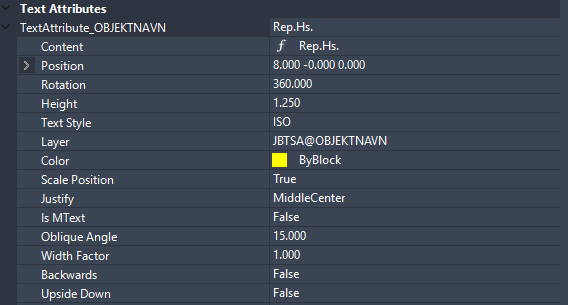
Screenshot of text attribute section of property manager

Value and Formula Picker

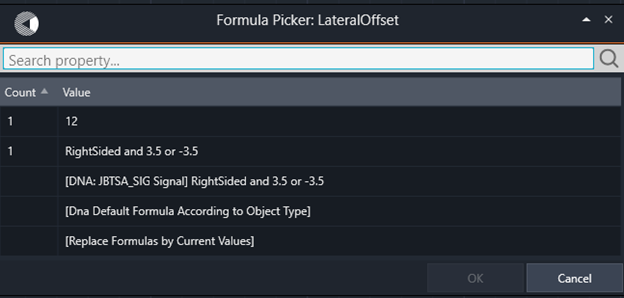
When editing several objects at once, you can now use “Pick Value” (F6) or “Pick Formula” (F7) to select the same value or formula for all the objects. You can also use this tool to make a new selection set consisting of all objects having the same value or formula as the one you select from the menu of available values / formulas.

The Value / Formula picker largely makes the existing command RC-EditProperties obsolete.

Screenshot of pick formula button in property manager
Screenshot of Pick Formula Window

Excel exports of tables are now much faster.

In addition to this there are lots of minor UI improvements, small features, and bugfixes.

RC 2024.2 – Better 3D Text Annotations Than Ever

3D Text Annotation

With RC 2024.2, making 3D graphics appear with annotations has become lightning fast. 3D glyphs (letters, digits, punctuation etc) are now fetched from a predefined set whenever you need to annotate your objects. With the new command RC-Create3DTextStyle you can convert any text style (font) on your computer into a 3D text style that RC may use for 3D annotations. The 3D text style creation command also computes the kerning for all two-letter combinations.

Other highlights for 2024.2:

  • Reduced size for 3D exported files (DWG or IFC)
  • Better contrast in Pset Definitions Manager menus
  • Better tooltips in the Pset Definitions Manager
  • Better sorting options in the Pset Definitions Manager
  • Moving the main object’s display point will now move also all attached objects’ display points accordingly.
  • Bug fixes


Property Sets with RailCOMPLETE

The waiting time is over! Let us introduce RailCOMPLETE Property Sets!

IFC and Property Sets

BIM users tend to work in collaboration projects where the common presentation format is IFC – Industry Foundation Classes, a rich text format devised by the Building Smart organisation and being read by a multitude of free or commercially available IFC viewers. The latest IFC version 4.3 supports not only graphics and how objects are connected, but also the mathematical definition of alignments such as tracks, roads and wires.

IFC comes with a range of standardised Property Sets, usually identified with a prefix ‘Pset_’, defining standardised information items for traditional entities such as walls, windows, doors etc for buildings. Users are invited to fill in values for these properties, which will be universally understood since their documentation and allowed values are part of the IFC standard. With IFC 4.3 the list of standardised entities has been extended to tunnel, bridge, road and rail.

Custom Property Sets are needed

It turns out that most organisations need more specific information items than those found in the IFC standard Psets. Luckily, the IFC standard allows users to define their own property sets.

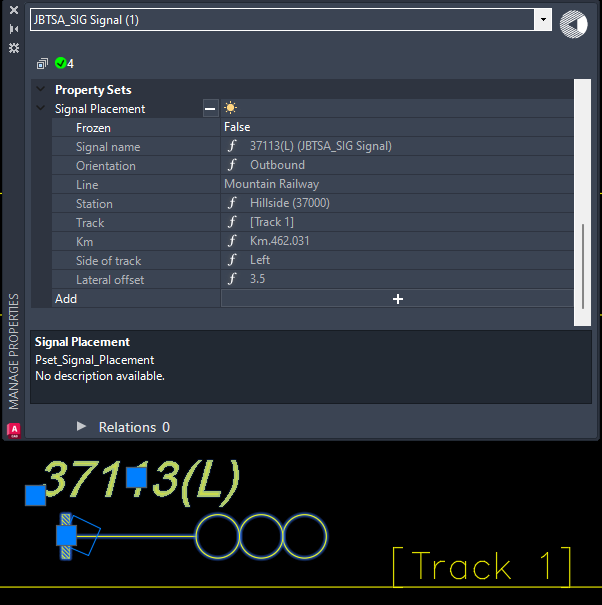
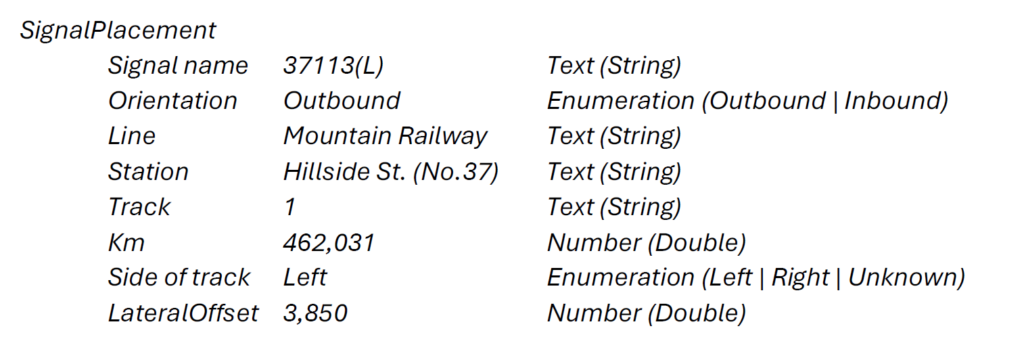
A Property Set has a recognizable Property Set Name and an associated collection of Properties. Each property has a Property Name and a Property Value field that will hold a value consistent with a specified Data Type. Here is an example from the railway realm:

RailCOMPLETE version 2024.1 offers a Property Set Definition Manager, making it easy to enter a property set’s definition and its default values.

Please consult the In-Depth article on RC Property Sets to learn more.

Using RailCOMPLETE and IFC BIM Modeling to Facilitate Railway Operations and Maintenance

As part of his studies in BIM at Oslo Fagskole, Åge Rasmussen has used RailCOMPLETE to model a fictional train station on the island of Smøla. The model was exported to IFC along with property sets containing information about the project and the objects for facilitating operations and maintenance. To add property sets to his RailCOMPLETE project, Åge used an early version of our new Property Set Definitions Manager, to be released soon as part of RailCOMPLETE 2024.1.

“In RailCOMPLETE this can be created quite easily by using the Property Set Definitions manager. I created one Pset for general project information and one for MMI (Model Maturity Index). I also needed to classify which objects these property sets should apply to. Both apply to all, so I selected all available RC object types in the “Applies To”-menu.”

We congratulate Åge on finishing his project. At Railcomplete AS we are always excited to see students make use of our software and eager to assist when we can.

RailCOMPLETE enters the Finnish marketplace

Railcomplete AS has signed frame contracts with two Finnish railway planning companies.

After an extended period of demo sessions and fruitful contractual discussions, in February 2024 we signed a frame agreement with the Finnish consulting company Proxion. Proxion aims at using RailCOMPLETE as a planning tool for both railway signaling and electrification.

From April 2024, we also have a frame agreement with Planmax, a smaller Finnish railway planning company. Planmax is targeting electrification.

We are proud of being trusted in Finland, and we are looking forward to solving Finnish railway planning challenges with competent Finnish customers.

Introducing RailCOMPLETE forum

Have you missed a public channel to discuss RailCOMPLETE matters with your peers? Now you can, with the new RailCOMPLETE forum.

Isn’t support@railcomplete.com enough?

So far, the only standard way of reaching RC developers has been to send an email to support@railcomplete.com. This tends to work well for questions that are clearly defined and whose resolution can wait for a few days. Problems that are less clear often require a back and forth, which can be cumbersome over email. In addition, some questions are easy and could be resolved within a couple of minutes but might still take a day or two to be answered by email.

Discord

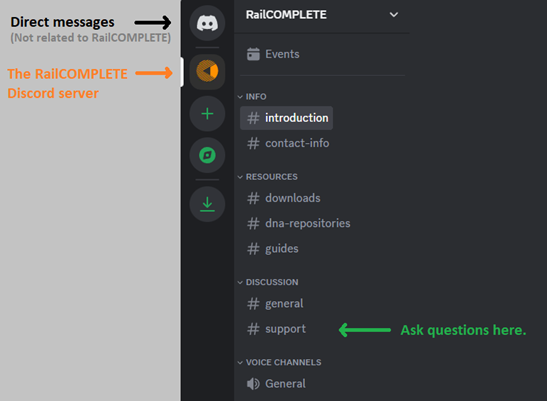
We have created a RailCOMPLETE forum, while keeping our support email as is. We’re using Discord as our solution for this. It’s forum-like platform that is popular in gaming communities. For now, our Discord forum server looks like this:

See here for a general introduction on Discord: https://support.discord.com/hc/en-us/articles/360045138571-Beginner-s-Guide-to-Discord.

You can join our Discord server here: https://discord.gg/HCNAwtDEnw.

Our Intention

Our hopes for the forum are as follows:

  • It will be easier for users to ask questions.
  • Users will receive replies more quickly.
  • Since our replies are publicly available other users could get value from them.
  • We want you to share your knowledge.

Using Discord as a support channel also has a couple of limitations. In such cases you may want to contact support@railcomplete.com:

  • Your question contains sensitive information that you don’t want to be public.
  • You want our answer to be an actual email so that you can forward it to your colleagues.

We believe that this can be a very useful tool, so we encourage you to investigate our Discord forum server and to ask questions there.

Hang on – FAQ will come

Discord forum servers are not indexed by search engines, so answers will not appear on Google, etc. Therefore, we will later publish an FAQ containing answers to questions about RailCOMPLETE.

Building Smart with IFC

– “A lot of exciting things are happening on many fronts in building and construction at the moment, and several of these were presented at this year’s international Building Smart trade fair, which this time took place in Lillestrøm north of Oslo,” says Eirik Hovind, developer of IFC at Lysaker-based Railcomplete AS. “We at Railcomplete are particularly interested in how we can utilize IFC in our work and we are exploring what opportunities the new file format can provide for railways. Therefore, it was extra nice that IFC Tunnel contacted us in advance, but let’s start at the beginning…”

What exactly is IFC?

IFC stands for “Industry Foundation Classes,” and is a file format used in the construction industry to store and exchange data about buildings, infrastructure and facilities. The format is designed to improve collaboration between different software tools and platforms used throughout the construction process, including architecture, engineering, construction, facilities management – and of course, rail development.

Rail development involves engineers, architects, contractors, rail companies and governments, and the IFC standard helps them to easily share and collaborate on project information, regardless of the software they use. This increases collaboration and coordination between different parties. Since the data exchange between the different software applications is standardized, the risk of data errors and inconsistencies is reduced.

Due to the rail networks’ high demands for accurate maintenance and management, IFC is highly suitable for creating digital twins of the rail infrastructure. This is useful for asset management, maintenance planning and infrastructure optimization.

In combination with BIM, IFC and BIM technologies can help improve the efficiency, quality and sustainability of rail development projects by enabling better collaboration, data exchange and documentation management throughout the entire lifecycle of rail infrastructure.

IFC takes shape for Tunnel and Rail

IFC as a file format has historically been used in the construction industry, but now the standard is being extended to rail and tunnel, bridge and road.

– “The nice thing about trade fairs like BuildingSMART is that those of us who usually sit in the office and code get to see how different forms of software are used, such as in the modeling software for the road tunnel excavations for the E18 West Corridor,” says Eirik.

The IFC Tunnel committee held a lecture series where Eirik had prepared a video about his contribution to IFC Rail. Since the use of IFC is relatively new in railways, work is still ongoing to reach a consensus on how best to communicate different concepts via IFC files.

– “We at Railcomplete have for several years participated and contributed to the committee for “Alignment With Cant” within IFC Rail”, says Eirik – “We have helped with the design of requirements for the format, created sample files and contributed with domain knowledge. In this work, we have contributed to create elegant formulations of complex and heavy data models with IFC Rail 4×3. Being able to make smart use of IFC Rail is important for keeping file sizes to a minimum – 3D files for railway facilities quickly become very large.”

– “Where we end up in the use of IFC and how we at Railcomplete will approach this is too early decide, but we are sure that IFC will play a bigger role for railways in the future,” Eirik concludes.


RailCOMPLETE 2023.2

IFC export

RC 2023.2 now exports your models to IFC. The most used IFC export formats are available: IFC2x3, IFC4 and IFC4.3.

Match Lua formulas between objects

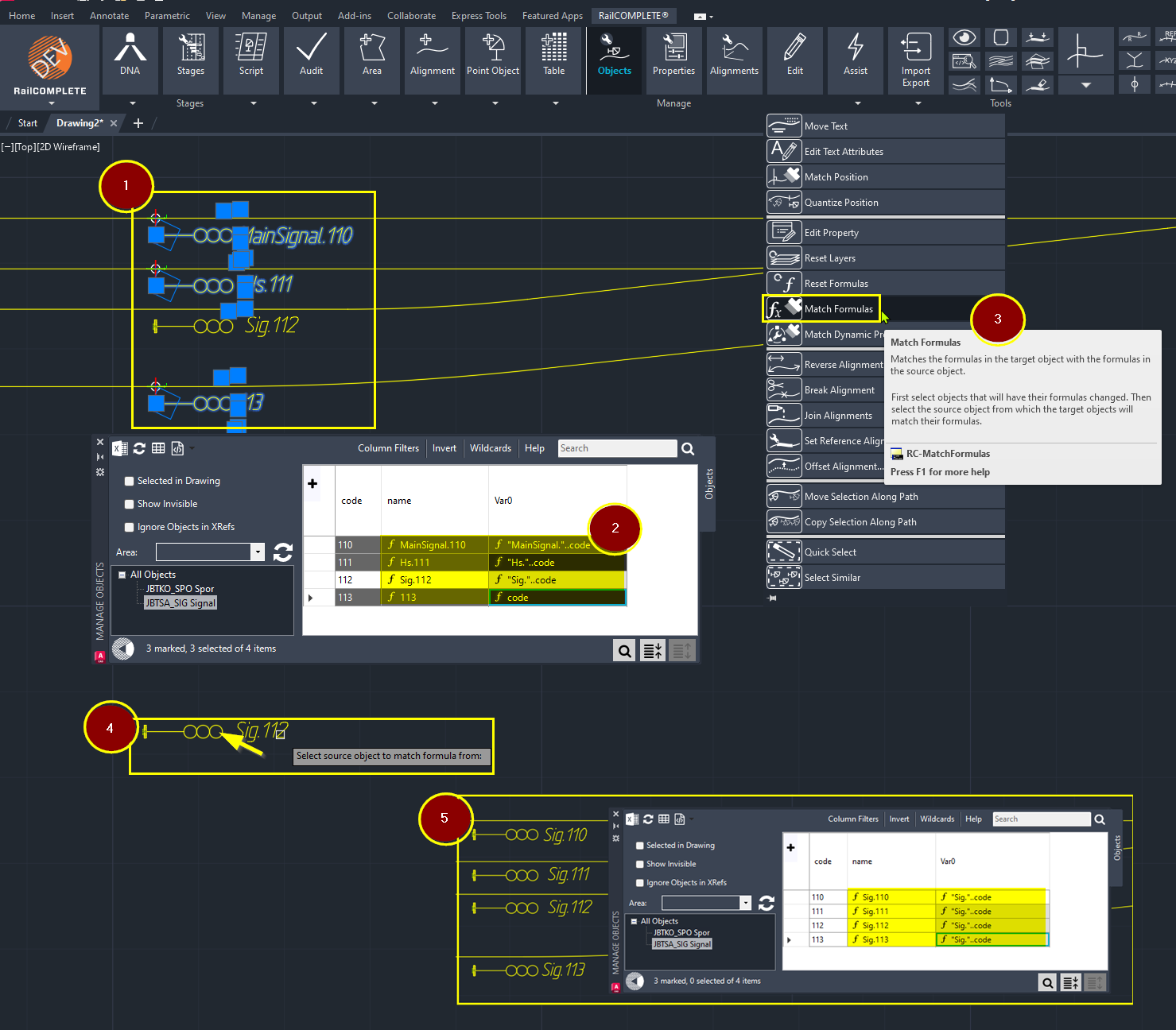
Matching Lua formulas between objects is now made easy:

(1) Select the objects that don’t contain the updated formulas…
(2) You may check in the Object Manager what the current formulas’ results are (for instance – different ‘name’ formulas).
(3) …Run the new RC-MatchFormulas command…
(4) …Then select an object that has the right Lua formulas in it.
(5) You may check again that all objects now possess the correct Lua formulas.

Interlocking control tables

Create interlockings for your signalling designs, with full control over train routes and shunting routes interlocking parameters and table presentation.

Objects in dead zones

Have you been annoyed by objects that get “NaN” (Not a Number) as a kilometer value because the track or overhead contact line it belongs to zigzags exactly where the object is located? RailCOMPLETE 2023.2 calculates the linear address of objects also in such dead zones, as specified in ISO 19148:2012. The kilometer value is taken from the kink point of the line, and then RailCOMPLETE calculates a longitudinal and lateral offset based on the direction of the line as it approaches the kink point.

Debugger

The new debugger in RailCOMPLETE version 2023.2 makes programming and debugging Lua code a breeze! Set breakpoints, view variable values and see how your Lua code executes – step by step.

Adding texts to 3D

The release of RailCOMPLETE 2023.2 is approaching rapidly! It’s now super easy to add explanatory texts to the 3D model. You choose the font, text height and thickness, and RailCOMPLETE does the rest.
illustration

Would you like to receive our newsletter?